Grain
Menu

Intelligent media management for photographers & filmmakers

One library for all your drives, photos, and footage. Turn raw media into organized source material for your next project or pitch.

Download for Mac
Save for my Mac

Send the setup link to your Mac.

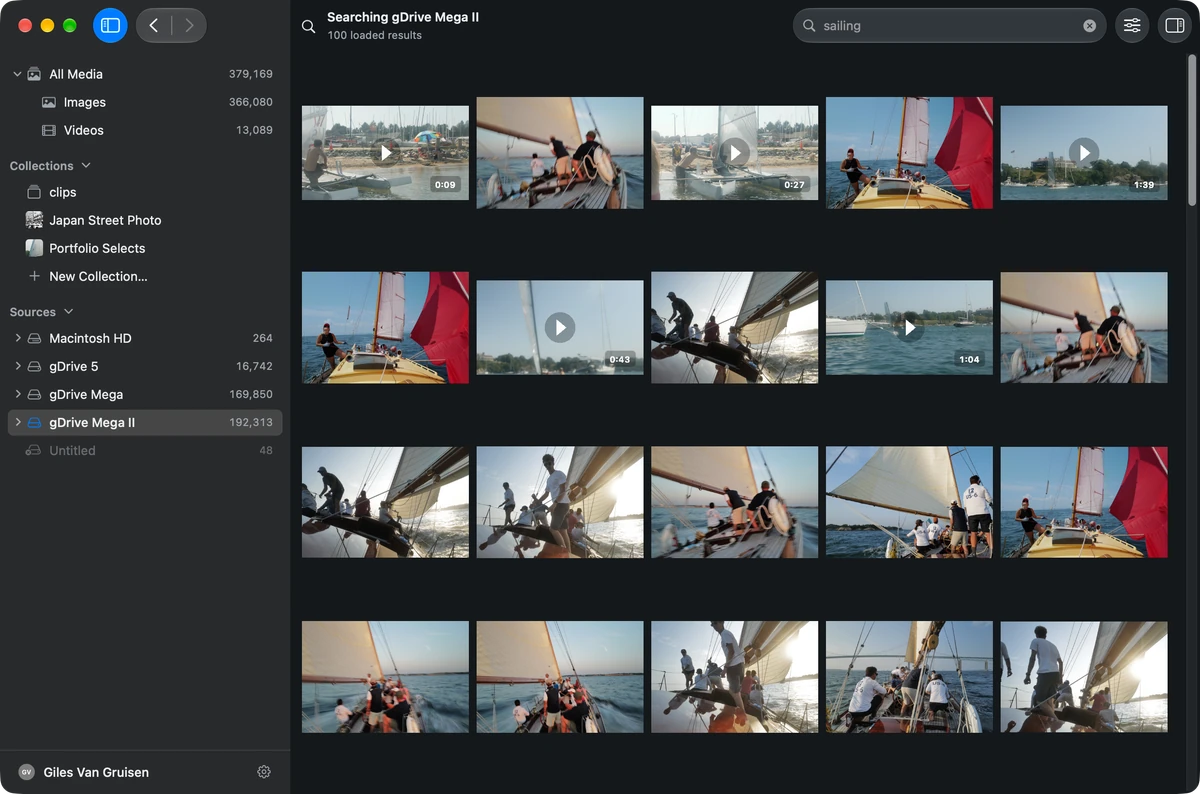
Grain Photo with a library of 379,169 photos and videos across several drives, searching the drive gDrive Mega II for sailing. The gallery shows sailing photos and video clips from that drive.

Every drive, one library.

Bring together your photos, videos, and RAW files across Mac, external drives, NAS, and Dropbox. Grain catalogs them where they are, and an unplugged drive stays in your library. No uploads, no migrations.

How one library works across your drives
  • Your MacInternal and expansion drives
  • External drivesHard drives, SSDs, and cards
  • Network storageNAS and shared drives
  • DropboxOther clouds coming soon

GrainOne libraryOne library, on your Mac

Browse & Review

Fly through years of photos and footage. Super-fast RAW previews and navigation, so you’re never stuck waiting.

Explore browsing and review

Clips Beta

All your footage, transcribed automatically on your Mac. Search dialogue and visuals, review takes, and cut clips for your editors and agents.

Learn more about Clips
  1. Automatic transcription

    Every recording is transcribed on your Mac, so you can read and search what was said.

  2. Visual descriptions

    Your agent describes what’s on screen, timed beside the dialogue.

  3. Clipping

    Keep the takes you want as clips. A clip marks a range on the original recording, so nothing is copied.

People Beta

Find the people you’ve photographed across every shoot and year. Name a face once, review the matches on your Mac, and gather their photos for a portfolio or delivery.

Learn more about People

Give your agents the right source material.

Give Claude, ChatGPT, and your editing agents the media and context to work with.

  • Build a client pitch deck.
  • Assemble a rough cut from Clips.
  • Create a client portfolio.
  • Prepare campaign content.
Connect your AI assistant

Built-in MCP and CLI access, with skills to guide your agent. Your library stays on your Mac; your assistant’s policies apply to what you share.

Example

  1. You: Find three close surfing shots in warm evening light for a client pitch.

  2. Searched Grain Photo

    Assistant: These three give us the spray, the turn, and the finish.

    • A surfer riding the face of a wave, the spray behind them lit gold by low sun
    • A surfer on a green board turning under a curling wave in warm evening light
    • A surfer carving through white water, spray lifting off the board in low light
  3. You: Turn these into a short pitch.

  4. Drafted the pitch

    Campaign concept

    Stay with the ride

    Keep the camera close enough to feel the water. Open on the gold-lit spray, follow the turn, and finish with the carve.

    1. Open On the face, spray lit gold behind.
    2. Turn Under the lip on a green board.
    3. Finish The carve through white water.

Make the most of your captured media.

Bring your photos and footage into the next edit, pitch, or delivery.

The tools behind your selections.

Explore all features

Questions

More answers on Support.

Does Grain replace Lightroom or Capture One?

Keep editing where you edit. Grain Photo is a photo and video organizer for Mac that reads the ratings and keywords those apps save to XMP.

Will it change my files?

No. Indexing and search only read your files. Ratings, keywords, collections, and custom fields live in Grain’s own catalog, so your originals and XMP sidecars stay as they are.

Does Grain upload my photos?

No. Grain Photo catalogs, analyzes, and searches on your Mac. With Dropbox, it reads from your own account. If you connect an external assistant, it receives catalog information and any previews or original file bytes you allow; that provider’s data handling applies.

How does the free trial work?

Download Grain, sign in with your email, and use the full app for 7 days. You don’t need a card to start. When the trial ends, Grain asks you to buy it for $49 to keep going. Nothing is charged automatically, and your files are never touched either way.

Put your media to work.

Turn every drive into one library of your work, ready for you, your editors, and your agents.

Download Grain
Save for my Mac

Send the setup link to your Mac.

7 days free · $49 once · Apple silicon Mac